Notes · MacTab
Making MacTab
Why I replaced my Mac's ⌘Tab with a real window switcher — and then rebuilt the same thing, natively, for Windows.

MacTab
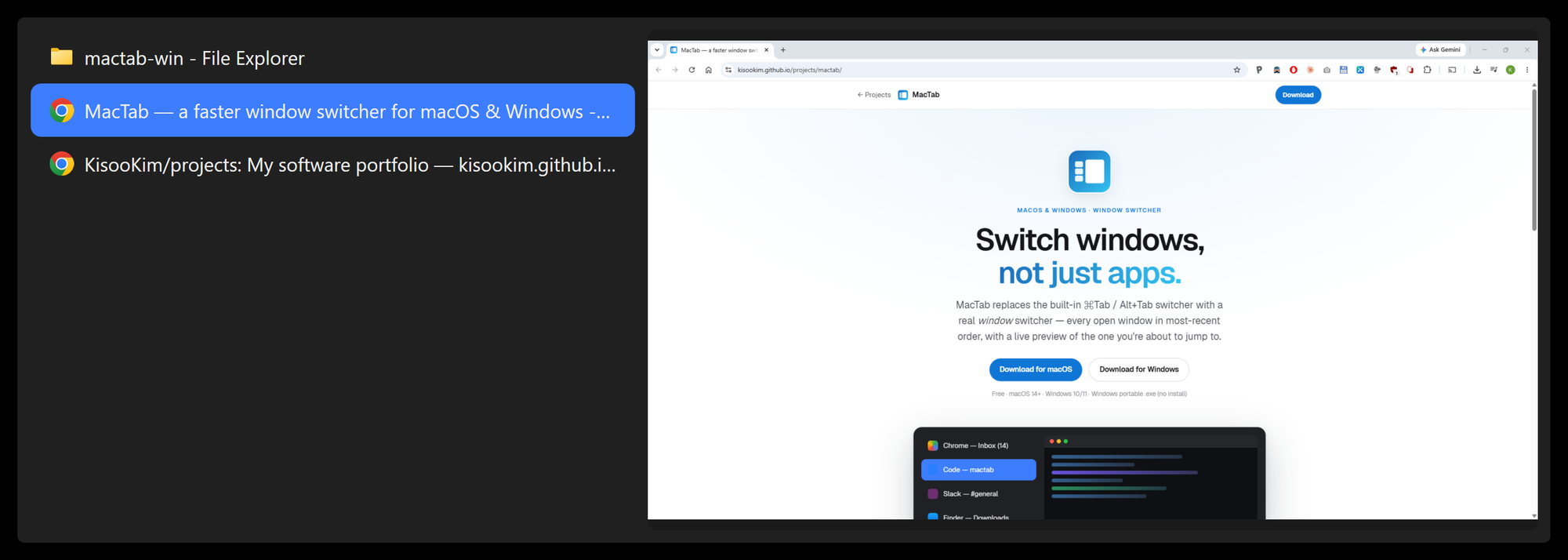
Every open window in most-recent order, with a live preview of the one you're about to jump to. Free, for macOS 14+ and Windows 10/11.
The itch
⌘Tab has one model of what you're doing: you use apps. Hold it down and you get a row of application icons — one per app, no matter how many windows each one has. My actual day doesn't look like that. It looks like two browser windows on two different projects, a PDF sitting next to the editor it's being written into, and a terminal somewhere behind everything. The thing I keep reaching for is not "the browser, as an application." It's the window I was just in.
Once you frame it that way, the design mostly writes itself. Order every window by when you last used it, and the one you want is almost always second in the list — one tap away. Show a live preview of the selected row, so you know you're about to land in the right place. And keep the native gesture — hold the modifier, tap to cycle, release to switch — so there's nothing new to learn, just a better list under an old reflex.
None of this is a novel observation, and macOS has good third-party switchers already (AltTab, most famously). I built my own anyway — partly because I wanted an exact set of behaviors and nothing else, and partly because this is an interaction I perform hundreds of times a day, and I wanted to own every detail of it.
macOS first
MacTab on the Mac is a menu-bar app written in Swift and AppKit. It takes over ⌘Tab itself rather than settling for some new shortcut, because the muscle memory is the product. Live window thumbnails come from a private framework (SkyLight), and mapping accessibility elements to concrete window IDs requires another private call — which together rule out the App Store entirely. MacTab ships as a notarized DMG instead.
The subtle part is knowing which window is "most recent." macOS doesn't hand you a global window-focus stream, so MacTab stitches one together: workspace activation notifications plus per-app accessibility notifications. Electron and Chromium apps drop those events often enough that chasing each loss is hopeless — so instead of pretending the stream is reliable, every refresh re-syncs against the real window z-order and corrects the list. When events are unreliable, reconcile state; don't chase ghosts.
Some of the work was learning what to delete. I built fuzzy window search — type a few letters while the switcher is open, jump to any window — across ten commits, and then killed it: typing a query while physically holding ⌘ contorts your left hand, and it fights the input-method switch key on a Korean layout. A switcher is a reflex, not a search box. A themable appearance engine met a similar fate — built, then hidden behind a fixed default. The product got better by shrinking.
One detail I did keep polishing: hovering the list only peeks. The highlight and preview follow your mouse, but leave the list and everything snaps back to the selection you had committed with the keyboard. The invariant is that the highlighted row, the preview, and what a release would confirm are always the same window.
Then Windows
I also work on a Windows desktop, and every day my hands expected the same switcher that wasn't there. Windows' Alt+Tab is already window-based, to be fair — but it's a grid of look-alike thumbnails rather than a readable list, and there is no app-scoped switcher at all (macOS's ⌘`). More than anything, I wanted one reflex that works identically on both machines.
The port is not a cross-platform wrapper. It's a second native app — C#, .NET, WPF — that treats the macOS version's behavior as its spec, down to the hover-peek semantics and the second-row preselection. Live previews come from DWM thumbnails, composited straight into the switcher panel. Two codebases, one design.
Two bugs I'll remember
The Alt+Tab that leaked. A low-level keyboard hook on Windows is only serviced while the thread that installed it pumps messages. Mine lived on the UI thread — so whenever WPF was busy building the switcher panel, the hook went unserviced past the system's timeout, and Windows quietly bypassed it: the native Alt+Tab broke through my custom one. The fix was structural, not clever — the hook now lives on a dedicated thread with its own message loop, and nothing the UI does can starve it. Windows gives up on slow hooks silently, by design; it protects input responsiveness at your app's expense, and you only find out from the symptom.
The one-pixel window. To open instantly without a white flash, the overlay window is created once and kept alive off-screen between uses. But a window that is fully off-screen stops receiving presents — the compositor treats it as occluded — so its surface freezes on the last frame of the previous session, and reopening flashed a stale list for a frame. I falsified two reasonable fixes first: forcing a compositor flush wasn't enough, and cloaking the window made things worse (cloaked windows aren't presented either). What stuck is almost embarrassing: park the window so exactly one device pixel peeks on-screen at the bottom-right corner of a monitor. Presents keep flowing; the rounded corner clip hides the pixel. Then the embarrassing fix got the serious treatment — a pure function, with unit tests, that picks the parking corner so the guarantee holds on any multi-monitor layout you can dock into.
Shipping without a certificate
Indie Windows distribution has a reality that macOS people rarely see: without a code-signing certificate (hundreds of dollars a year), Microsoft's modern package format can't even be sideloaded. So MacTab ships with a classic Inno Setup installer — per-user, no admin prompt, no certificate required — plus a portable exe for people who'd rather not install anything. SmartScreen still shows its warning on first run; that's the toll every unsigned indie app pays until reputation accrues.
And one lesson bought at full price: the first portable exe I uploaded was broken on every machine but mine — the build had left runtime DLLs sitting next to the exe, so the exe alone wasn't actually self-contained, and it worked locally only because those DLLs happened to be there. The release gate now includes copying the exe, by itself, into an empty folder on a clean machine and watching it start.
Where it is now
MacTab is my daily switcher on both machines, and it's deliberately small: Alt+Tab / ⌘Tab for every window, Alt+` / ⌘` for the current app's windows, most-recent order, live preview, keyboard or mouse. The Mac version adds optional extras (four hotkey slots, a three-finger trackpad gesture); the Windows version keeps the two hotkeys that cover a normal day. It's free.
If the itch sounds familiar: the product page has downloads for both platforms.
Written July 2026, around MacTab 0.1.0. · More notes · Home